Preventing accidental device wipe with multiple administrative approval in Microsoft Intune

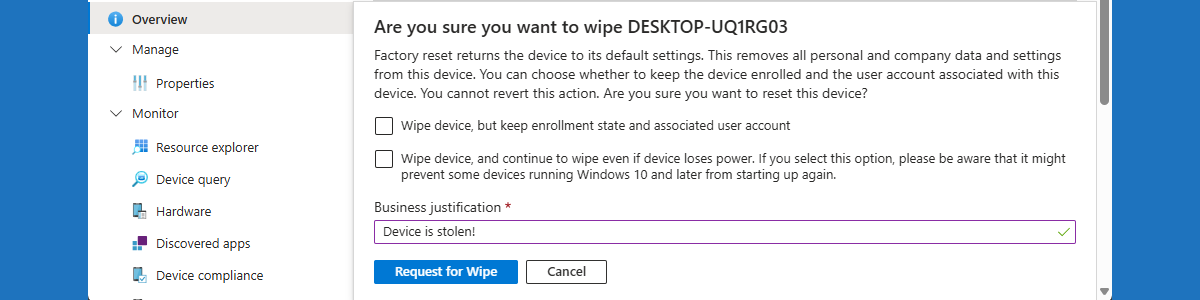
This week is all about the preventing accidental device wipes by using multiple administrative approval in Microsoft Intune. Multiple administrative approval on itself is nothing new, but the latest addition to that functionality makes it a lot more powerful. Before, multiple administrative approval was mainly focused adding apps and scripts to Microsoft Intune. Nowadays, multiple administrative approval can also be used for Intune roles and the most critical device actions. Those device actions include device wipe, device retire, and device delete. With those device actions, there will be a little safety net for IT administrators when performing impactful device actions without really giving in on security. Multiple administrative approval will help with preventing accidentally wiping a device. Every device wipe will require an approval from …

Read more

Getting started with Windows Backup for Organizations

This week is all about the new Windows Backup for Organizations feature that has become available. The Windows Backup for Organizations feature is initially aimed at making it easier to transition from Windows 10 to Windows 11. Besides that, it also makes it easier to switch towards new Windows 11 devices and versions. At this point in time Windows Backup for Organizations can be used to preserve user settings and Microsoft Store app configurations. Especially the first part seems to have a lot of similarities with the already existing Enterprise State Roaming functionality. One might consider Windows Backup for Organizations as the on steroids version of Enterprise State Roaming. Where Enterprise State Roaming is really focused on the basics of the user experience, Windows Backup …

Read more

Managing the usage of personal Microsoft accounts in the OneDrive app

This week is all around managing and containing the usage of personal accounts with the OneDrive app on managed Windows devices. That is definitely not something new, but a recent change in notifications did trigger this post around the usage of personal accounts. Actually, it all started with an item on the public roadmap (490064). That roadmap item is about a new feature that will prompt users for using their personal Microsoft accounts with the OneDrive app, but only when a personal account is already signed in on the device. Of course, one might wonder if that’s a really good approach, but especially the latter part is important; the user will only be prompted when a personal account is already signed in on the device. …

Read more

Using device clean-up rules in Microsoft Intune

This week is a relatively short post about the updated device clean-up rules in Microsoft Intune. There can be many reasons why it is important to clean-up devices in Microsoft Intune (and Microsoft Entra). That can be security related by preventing access to resources, that can be cost savings by preventing device licenses from being used, and that can often even be as simple as preventing clutter in the Microsoft Intune admin center portal and keeping reports accurate. The standard functionality within Microsoft Intune to automatically clean-up devices, got a nice update with the latest service release (2507). It is now possible to create device clean-up rules per platform. And, with that, differentiate per platform. The main concept remains the same. Device clean-up rules are …

Read more

Excluding specific files from being uploaded to OneDrive

This week is another relatively short blog post, again somewhat related to Microsoft Edge. This week, however, is about configuring some specific OneDrive configurations. More specifically, the focus will be on excluding specific files from being uploaded to OneDrive. Not something really new, but the importance became clear again this week. There can be many reasons why organizations might want to exclude specific files from being uploaded to OneDrive, but there are also some generic reasons that are applicable to most organizations. An often heard reason is related to desktop shortcuts. Synchronizing desktop shortcuts (or even shortcuts in general) often results in either duplicate shortcuts or shortcuts to missing applications. Another reason is related to organizational branding in Microsoft Edge. Customizing organizational branding relies on …

Read more

Protecting against typosquatting with website typo protection in Microsoft Edge

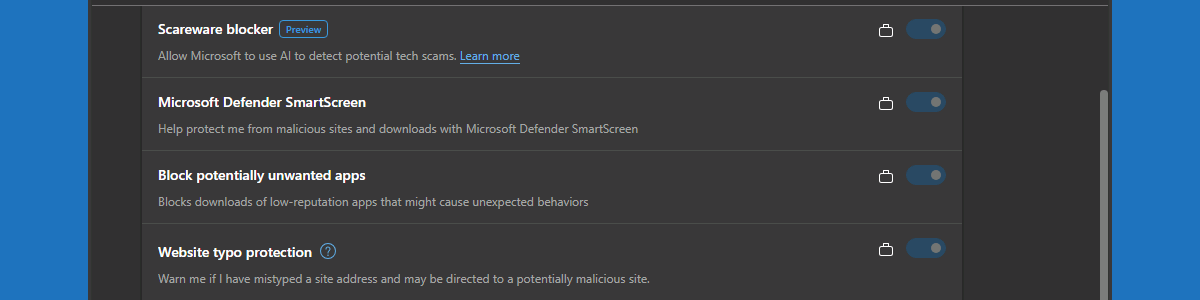
This week is a short post about website typo protection in Microsoft Edge. That subject was briefly mentioned earlier when discussing Enhanced Security Mode in this blog post about tightening browser security in Microsoft Edge. This week is mainly focused on awareness for website typo protection. Website typo protection is aimed at protecting users against typosquatting. Typosquatting is intended to hijack traffic of users that meant to visit well-known sites, but that made a spelling mistake. That hijacking is achieved by using addresses with common misspellings or typographical errors of those well-known sites. Often that is used as prank, ad, or (friendly) competition, but more and more often that is also being used for phishing and malware. In the latter cases, users will get to …

Read more

Getting started with Quick Machine Recovery

This week is all about a relatively new recovery functionality in Windows. And that functionality is Quick Machine Recovery, which is also known as Cloud Remediation. Quick Machine Recovery is focused on the recovery of Windows devices when encountering critical errors that prevent the device from booting. A huge strength of Quick Machine Recovery is that it can automatically search for remediations online and use that to recover from widespread boot failures. In practice that means that Quick Machine Recovery helps with addressing the most severe failures within the environment. The type of system failures that gets devices stuck in the Windows Recovery Environment (WinRE). The type of system failures that require significant troubleshooting time. And that’s especially challenging when it’s a widespread outage. Quick …

Read more

Blocking Bluetooth on Android devices

This week is all about a new configuration option for corporate-owned Android Enterprise devices. That new configuration option is the ability to block the usage of Bluetooth. There can be many different reasons why organizations might want to block the usage of Bluetooth on (some) Android devices within the environment. That could be simply from a functional perspective to preserve battery and to extend the usage time, but that could also be more from a security perspective to prevent the device from being exploited. For the latter think about unauthorized access, data interception, malware distribution, or even something like bluejacking (sending messages to nearby devices). All pretty good reasons to think about the default availability of Bluetooth on Android devices within the environment. Especially on …

Read more

Blocking other browsers with policies for Microsoft Edge (be careful)

This week is all about creating awareness. Creating awareness for the configuration options that are available for Microsoft Edge via the Microsoft 365 admin center, also known as the Microsoft Edge management service. The Microsoft Edge management service is an alternative method, besides Microsoft Intune, for configuring the Microsoft Edge browser via the Cloud. The configurations are stored in the Cloud and the settings can be applied through a group assignment. The user must be signed into the browser to receive those settings, and the browser must be restarted to make new settings applicable. So, pretty similar to the capabilities within Microsoft Intune. Besides that, the Microsoft Edge management service also provides access to additional settings, such as organization branding, AI, and specific security settings. …

Read more

Experiencing the app relationship viewer

This week is a relatively short blog post, focused on providing awareness for the recently introduced app relationship viewer. The app relationship viewer can be used to see which apps are directly connected to the selected app. Those connected apps are also known as child apps. Child apps can be either dependent apps or superseded apps. A dependent app relationship is an app that is configured as a dependency for the installation of the selected app, and a superseded app relationship is an app that is configured to be superseded by the installation of the selected app. Those relationships are shown within the app relationship viewer. But not just for the selected app, but also for the child apps. This blog post provides a brief …

Read more