Skip to content
All about Microsoft Intune

All about Microsoft Intune

Peter blogs about Microsoft Intune, Microsoft Intune Suite, Windows Autopilot, Configuration Manager and more

  • Home
  • About
  • Contact
  • Archive
  • Scripts

Automatic Account Management

Easier managing account management modes for Windows LAPS

April 7, 2025 by Peter van der Woude

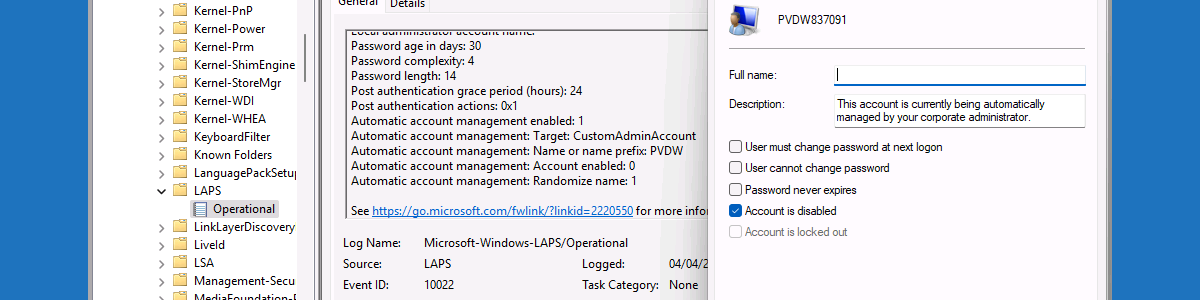
This week is a follow-up on a post of about a year ago about using the automatic account management mode of Windows LAPS. That time the post was all focused on the preview functionality that was available within Windows and that could be configured by using custom configuration profiles. This time it’s all about the general available functionality in Windows and Microsoft Intune. Windows LAPS can be used to help organizations with securing the built-in local administrator account that is available on each Windows device. The account management mode provides more flexibility on top of that, as it can be used for creating, configuring and managing a specific target account. That includes the ability to configure the target account, randomizing the account name, and configuring a …

Read more

Share this:

  • Share on LinkedIn (Opens in new window) LinkedIn
  • Share on Bluesky (Opens in new window) Bluesky
  • Share on Reddit (Opens in new window) Reddit
  • Share on X (Opens in new window) X

Like this:

Like Loading…
Tags Automatic Account Management, Microsoft Intune, Windows 11, Windows LAPS 12 Comments

Using automatic account management mode of Windows LAPS

February 19, 2024February 19, 2024 by Peter van der Woude

This week is sort of a follow-up on a post of about a year ago about getting started with Windows LAPS. That time it was really focussed around the basics of managing the password of the specified local administrator account. This time it’s all about recently introduced features to take that management to another level. An important part of those new features is the account management mode. The account management mode can be used for creating, configuring and managing the target account. Besides that, those new features also include an improved readability password dictionary, a new passphrase feature and a new image rollback detection feature. All of those features are focussed on even better protecting those local administrator accounts. This post will focus on probably …

Read more

Share this:

  • Share on LinkedIn (Opens in new window) LinkedIn
  • Share on Bluesky (Opens in new window) Bluesky
  • Share on Reddit (Opens in new window) Reddit
  • Share on X (Opens in new window) X

Like this:

Like Loading…
Tags Automatic Account Management, Microsoft Intune, Windows 11, Windows LAPS 6 Comments
Award
Subscribe

Join 1,463 other subscribers
Support

More support

If you enjoy reading my content, please consider buying me a coffee. That helps me with staying awake, and keeping my blog online.

About me

I'm Peter van der Woude, born in 1983 and I'm living together with my wife and two sons in the Netherlands. I work as a Solution Architect at Gasunie, in the Netherlands, and I am working closely with the organization to achieve the best fitting workplace solution.

Calendar
September 2026
S M T W T F S
 12345
6789101112
13141516171819
20212223242526
27282930  
« Aug    
Latest posts
  • Configuring Point-in-time restore in Windows
    by Peter van der Woude
    August 31, 2026
  • Managing Apple Intelligence on iOS and iPadOS devices
    by Peter van der Woude
    August 24, 2026
  • Collecting Windows registry data
    by Peter van der Woude
    August 17, 2026
  • Customizing the pinned folders in Start layout
    by Peter van der Woude
    August 10, 2026
  • Customizing the power options in Start layout
    by Peter van der Woude
    July 6, 2026
Tags

Android Android Enterprise Azure AD Conditional Access ConfigMgr ConfigMgr 2007 ConfigMgr 2012 iOS ipadOS MDM Microsoft Edge Microsoft Endpoint Manager Microsoft Intune OMA-DM OMA-URI Powershell SCCM Task Sequence Windows 10 Windows 11

© 2009 - 2026 PETER VAN DER WOUDE
%d